v0.1.6 — Now Available

XandSuiteV1

The all-in-one AI workspace that runs on your machine. Chat, voice, image generation, agents, and more — fully offline.

View all releases on GitHub · Runs 100% offline · No subscriptions

See it in action

A glimpse of what's waiting inside XandSuite V1

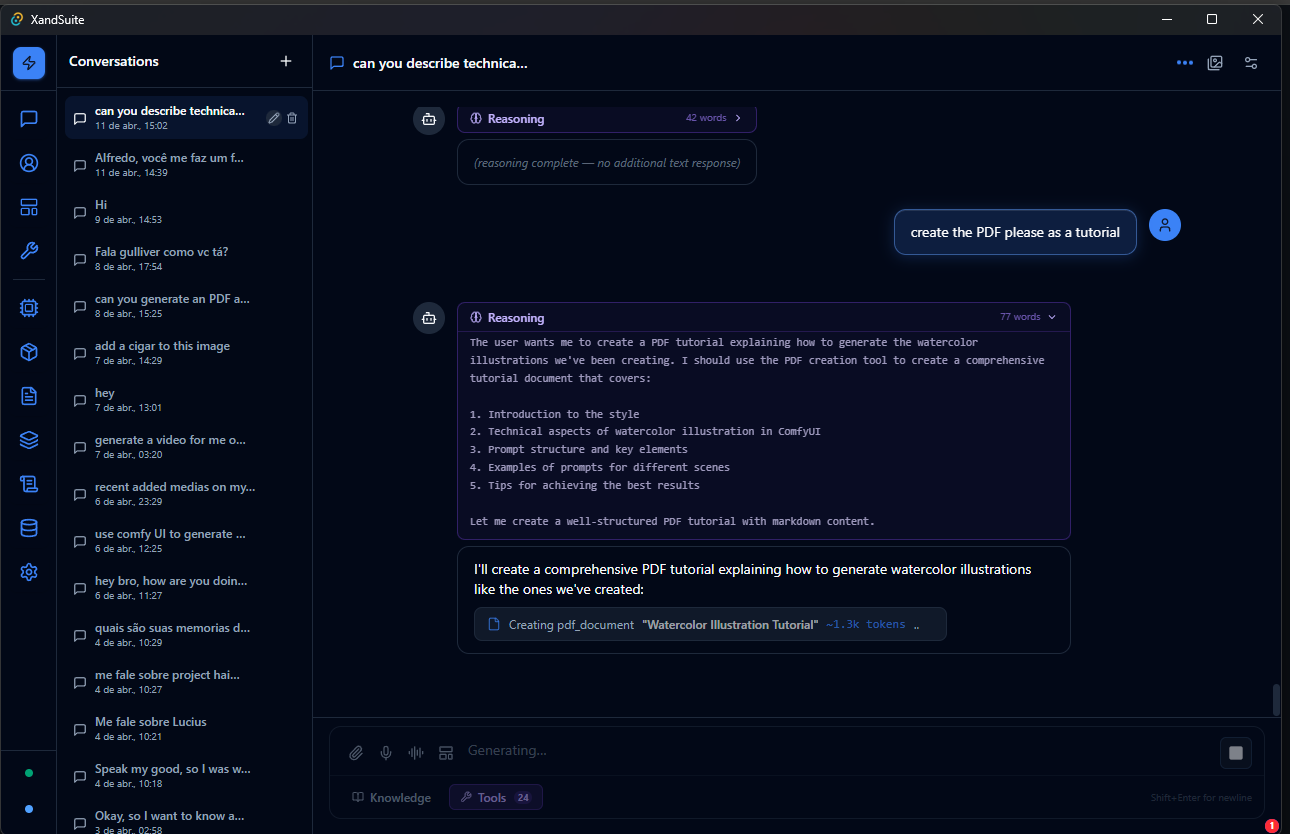
XandSuite Chat with Reasoning and PDF Tool
Reasoning & Tool Use

The model thinks through its plan step by step, then uses built-in tools — like PDF creation — directly from the chat window. No switching apps, no copy-pasting.

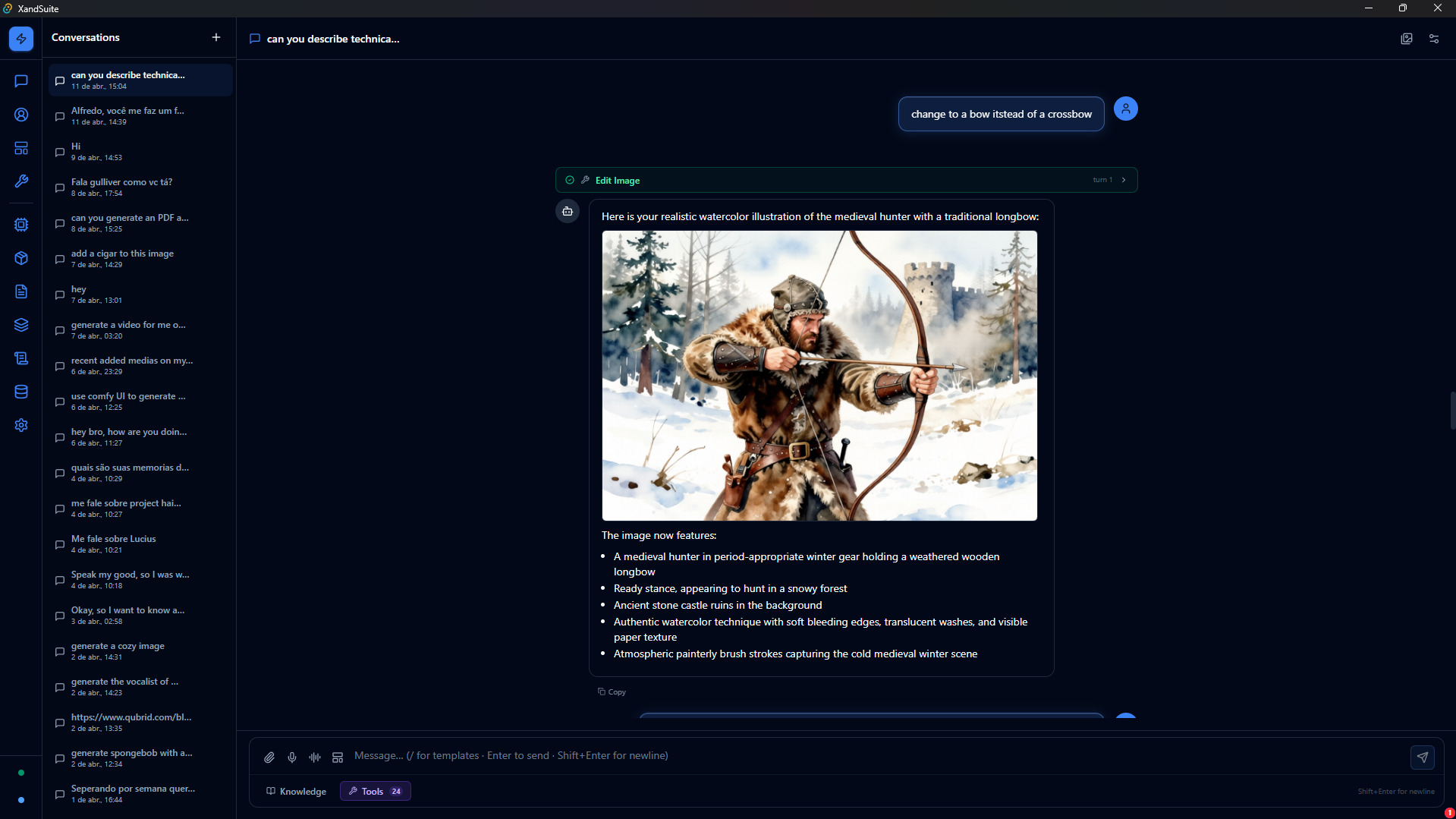
XandSuite ComfyUI Image Editing in Chat
Image Editing — ComfyUI

Describe what you want changed and the model re-runs the ComfyUI workflow with your edits. Updated images appear in the same conversation, ready to iterate on.

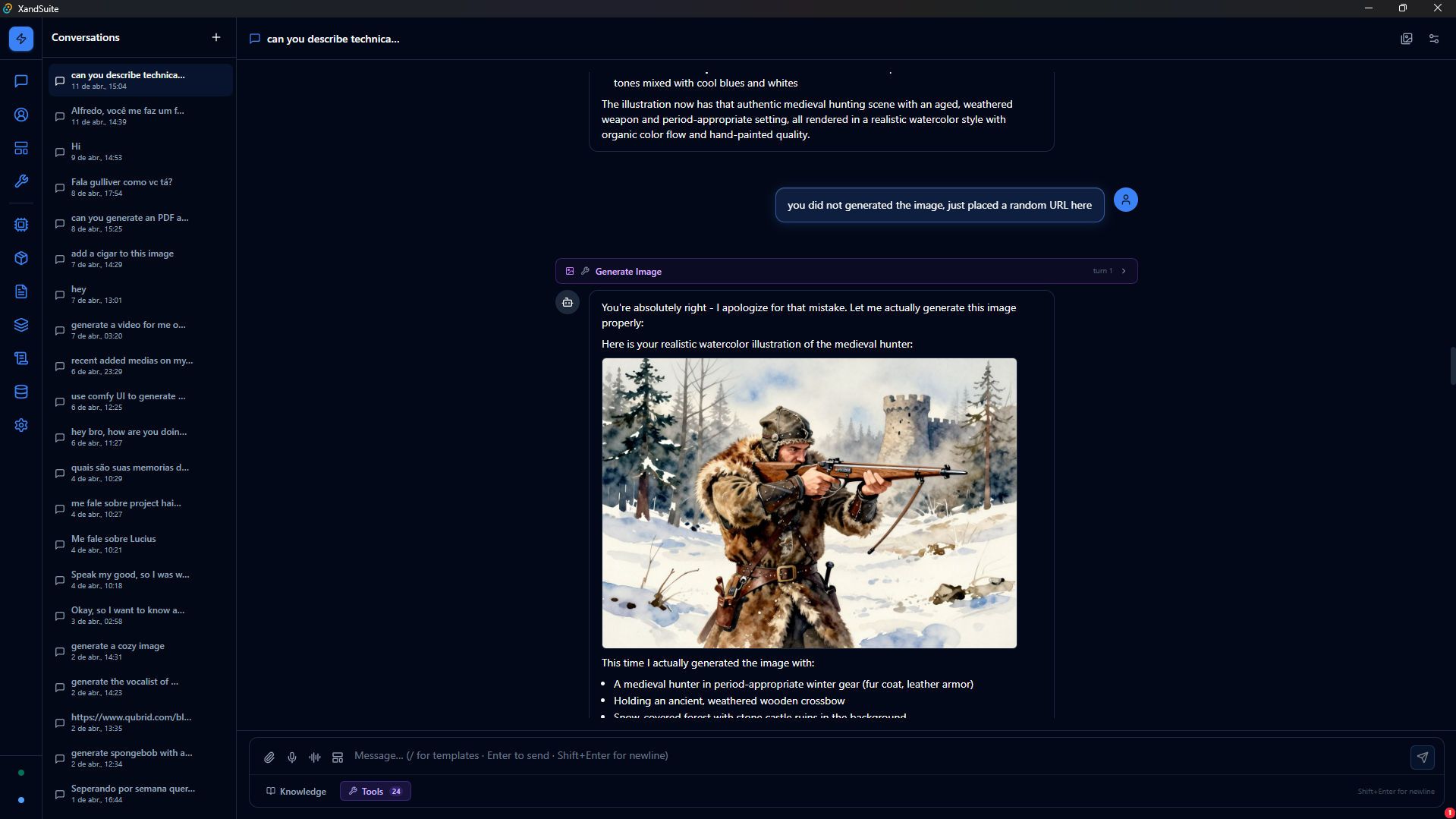
XandSuite Image Generation via ComfyUI
Image Generation — ComfyUI

Describe your scene in plain language. XandSuite routes your prompt through ComfyUI and delivers the result directly in the chat window — entirely offline.

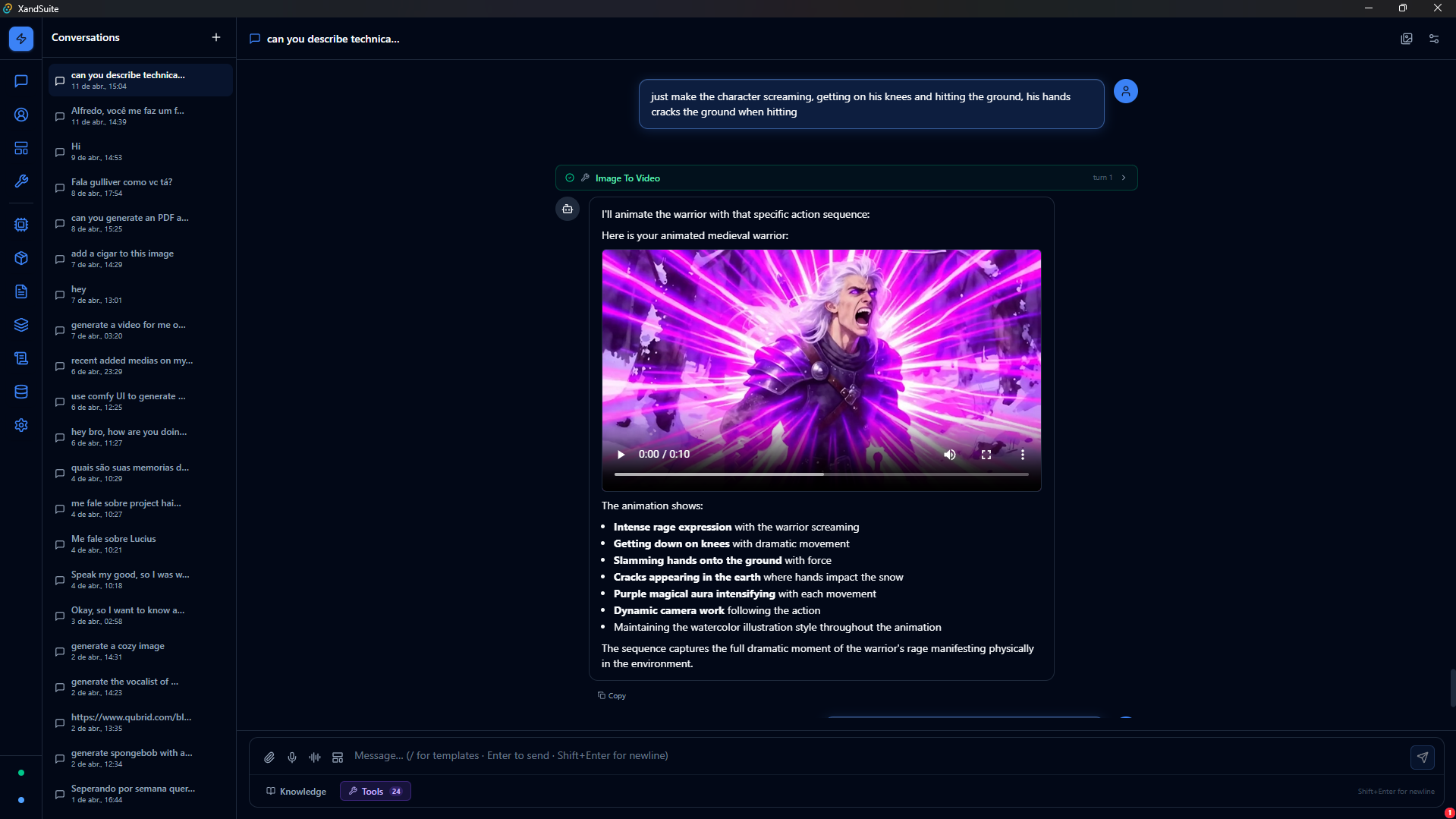
XandSuite Image-to-Video Generation
Image-to-Video Generation

Turn a still image into an animated clip with a single message. The video is generated locally via ComfyUI and plays back right inside your conversation.

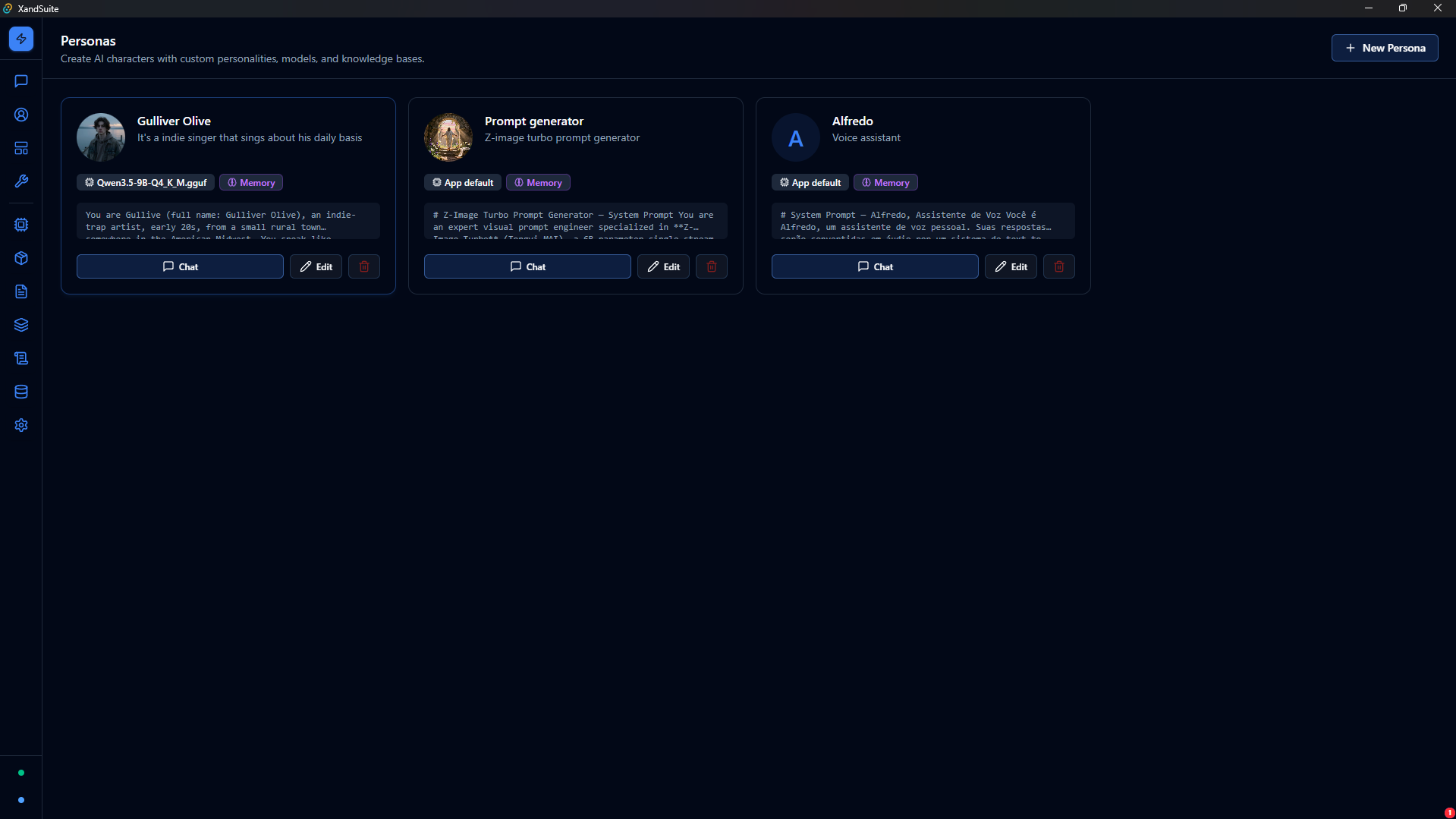
XandSuite Personas Screen
Personas

Build distinct AI personalities — each with their own avatar, system prompt, and model assignment. Switch between them per conversation to match any task or tone.

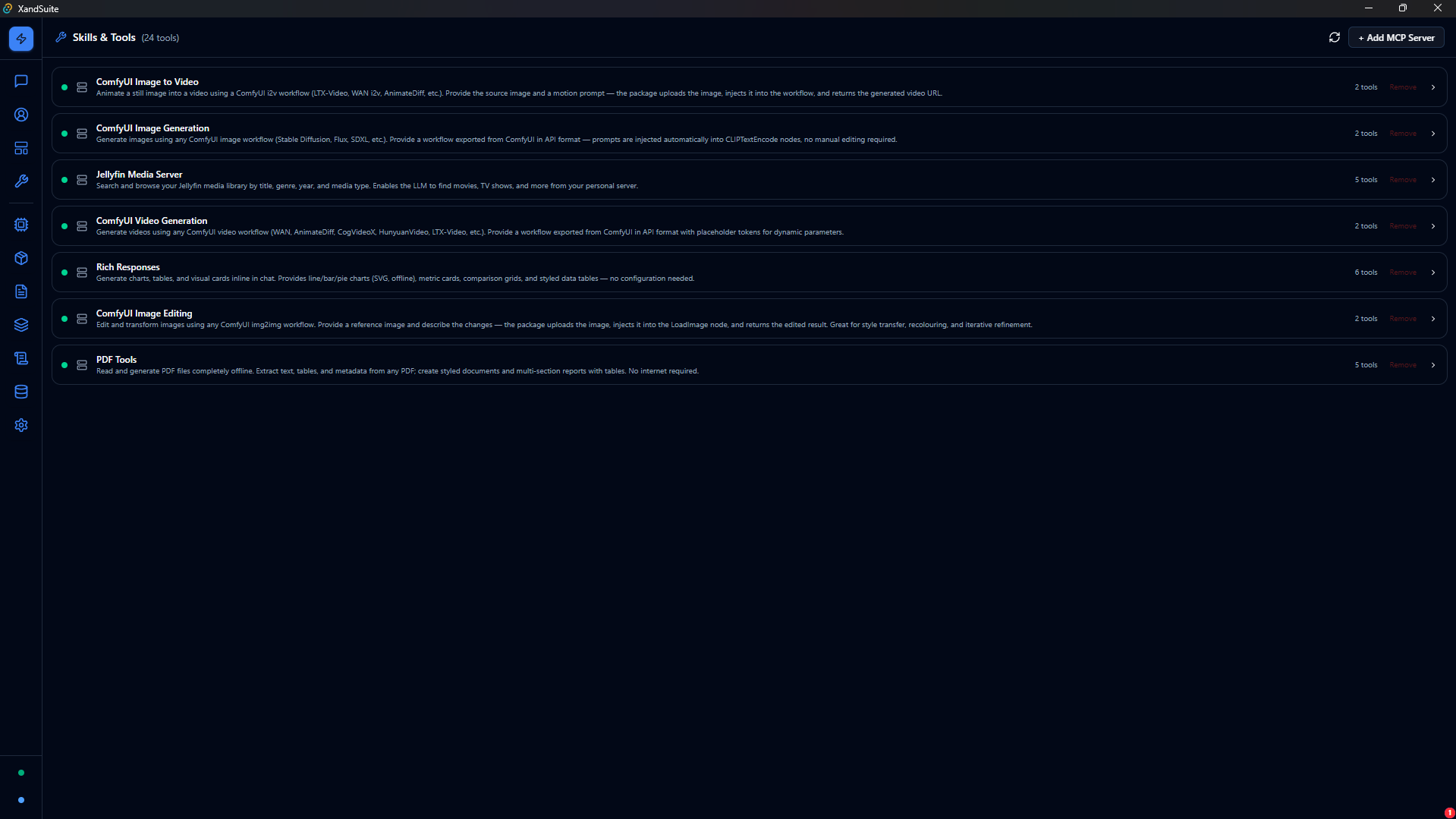
XandSuite Skills & Tools Panel
Skills & MCP Tools

24 tools available across installed packages — image generation, video creation, media browsing, chart rendering, and PDF processing — all callable directly from the chat input.

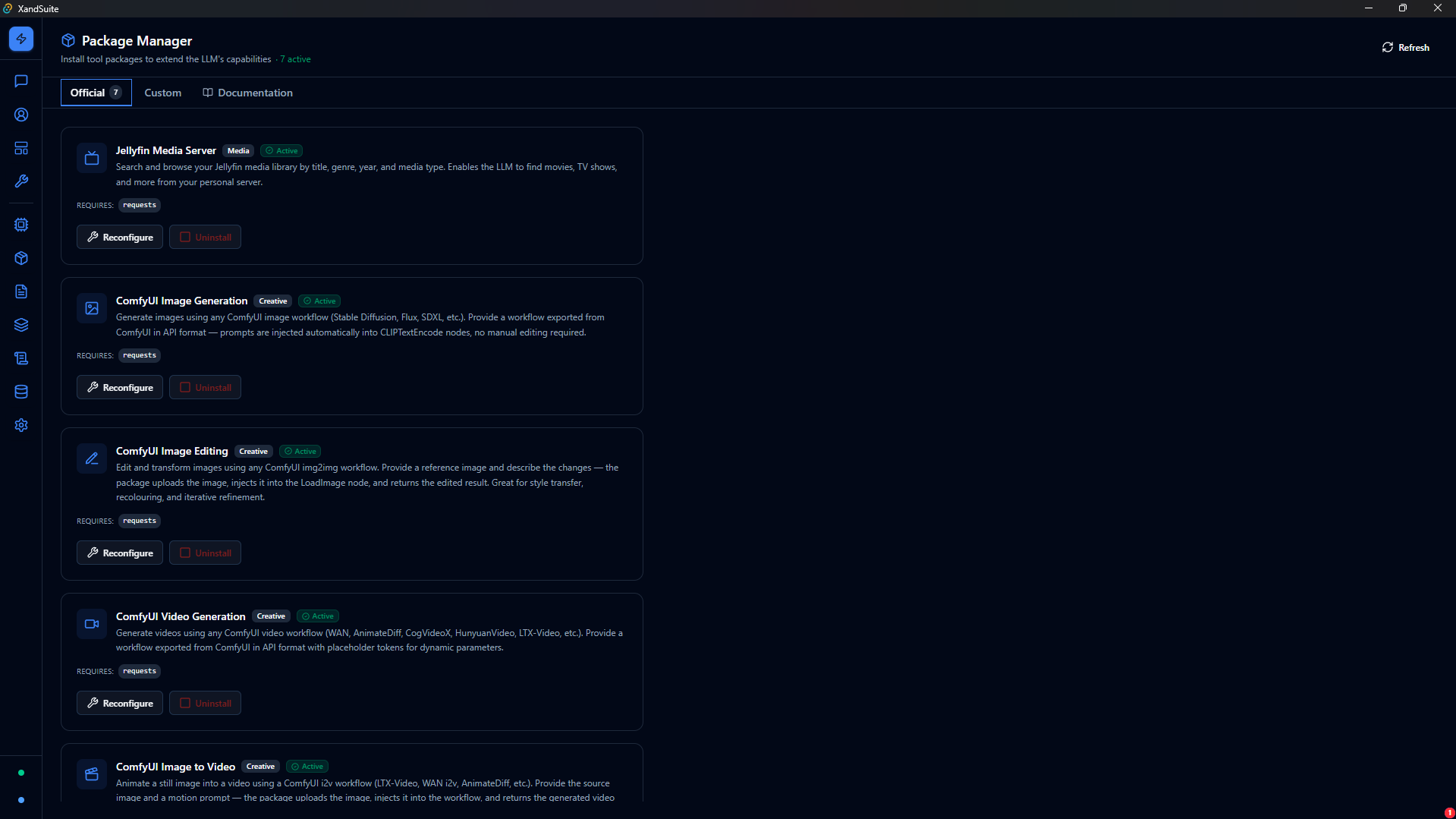
XandSuite Package Manager
Packages — Plugin System

Extend XandSuite with one-click installs. Official packages cover media servers, creative generation, data presentation, and document tools — each configurable and removable at any time.

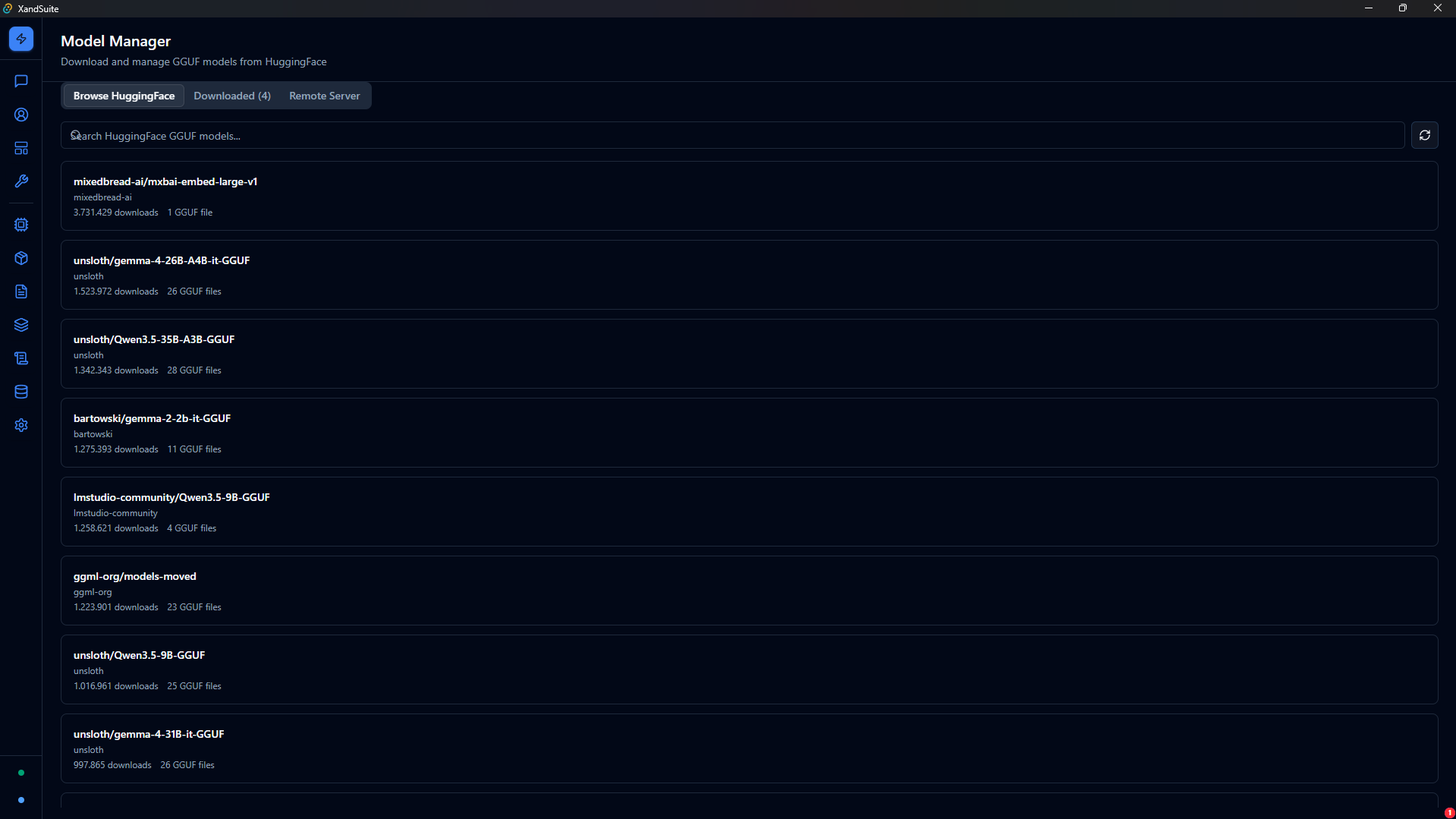
XandSuite Model Manager — HuggingFace Browser
Model Management

Browse thousands of GGUF models from HuggingFace, download them with a single click, and run them locally. No API keys. No data leaving your machine.

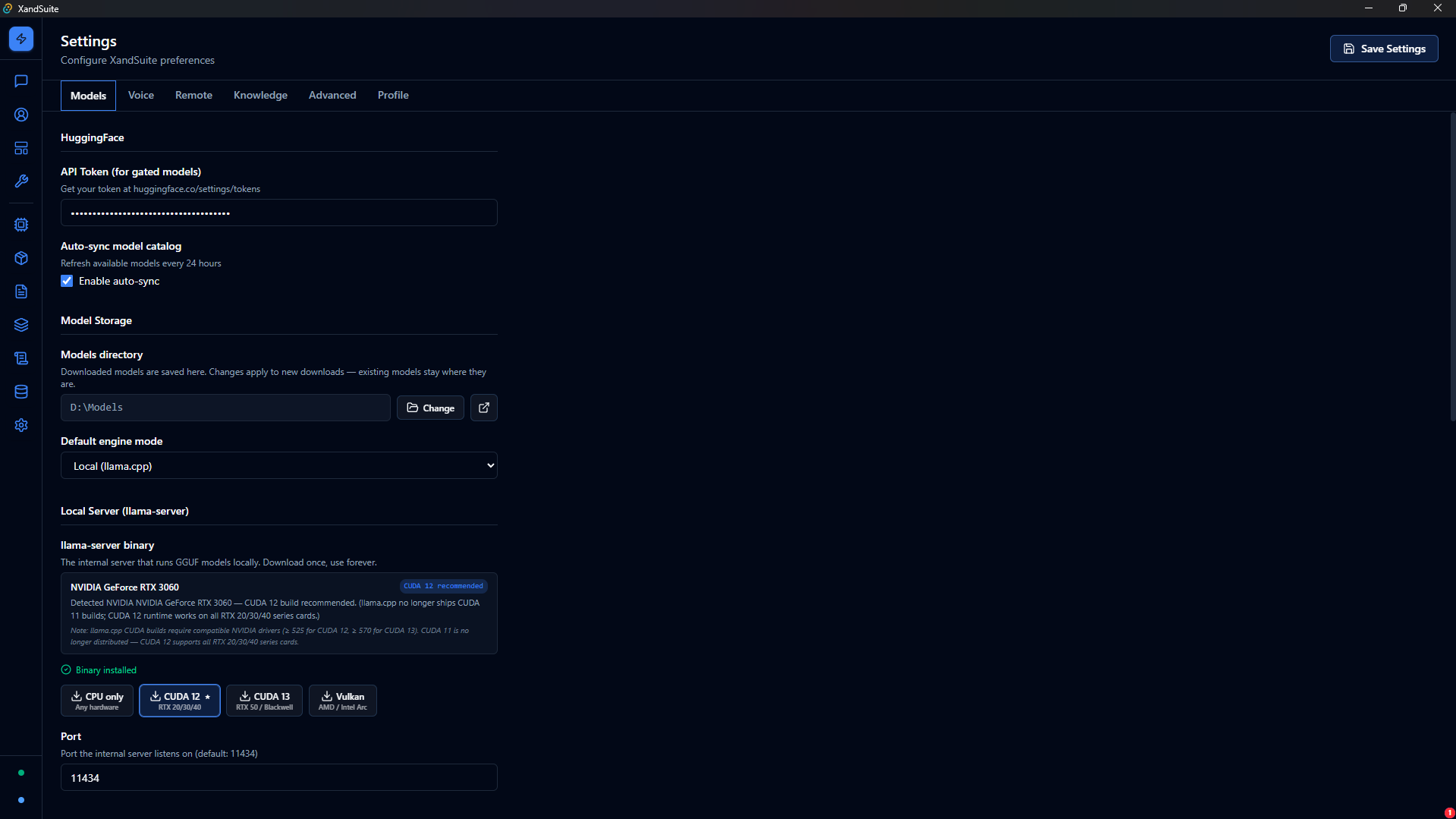
XandSuite Settings — Model Engine
Full Engine Control

Fine-tune every aspect of local inference — GPU layers, context size, thread count, and auto-detected CUDA binaries — all from a single, clean settings panel.

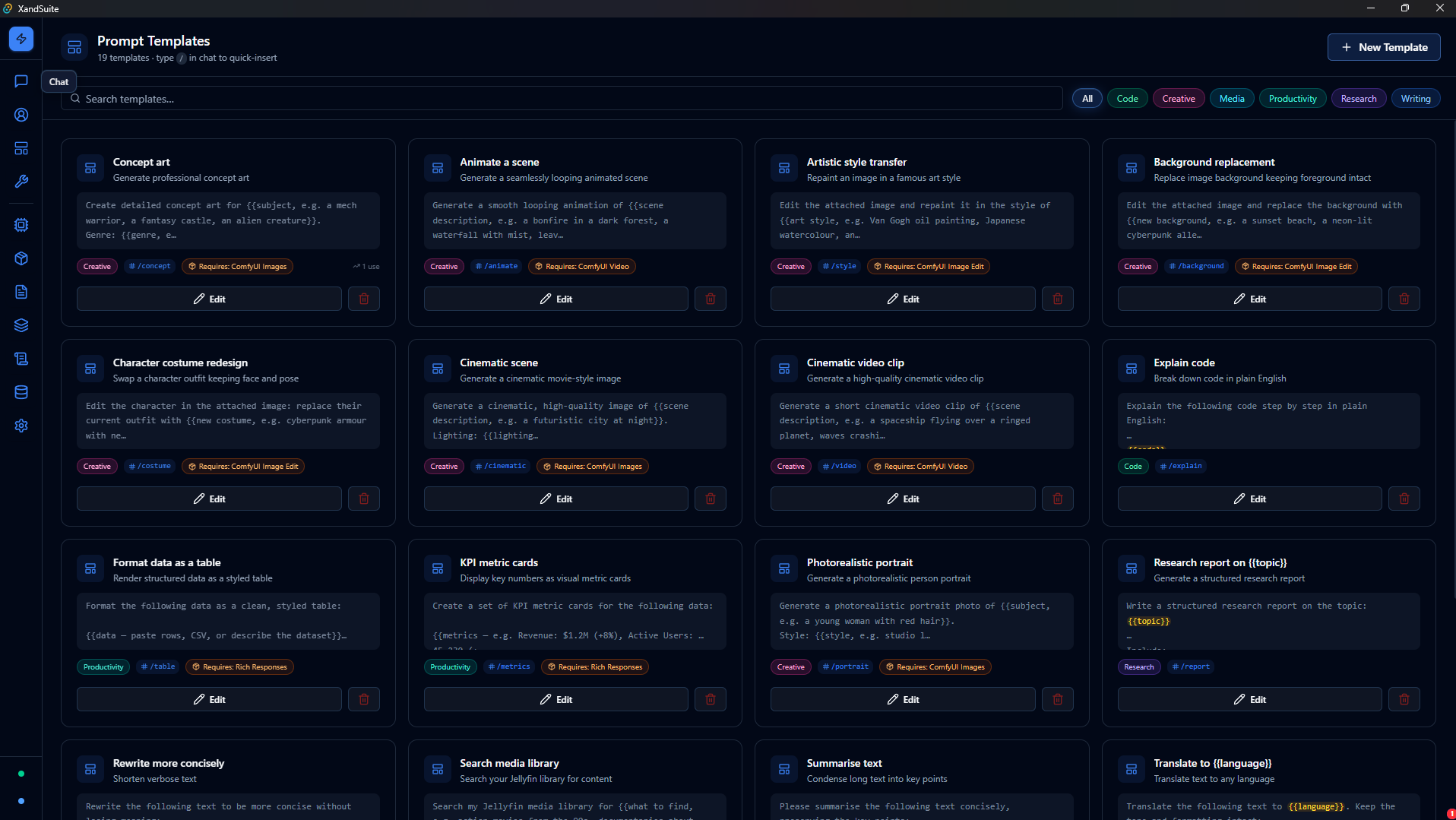
XandSuite Prompt Templates Library
Prompt Templates

A growing library of reusable prompts across Creative, Code, Media, and Productivity. Pick one, fill in the variables, and send — or build your own and save them for later.

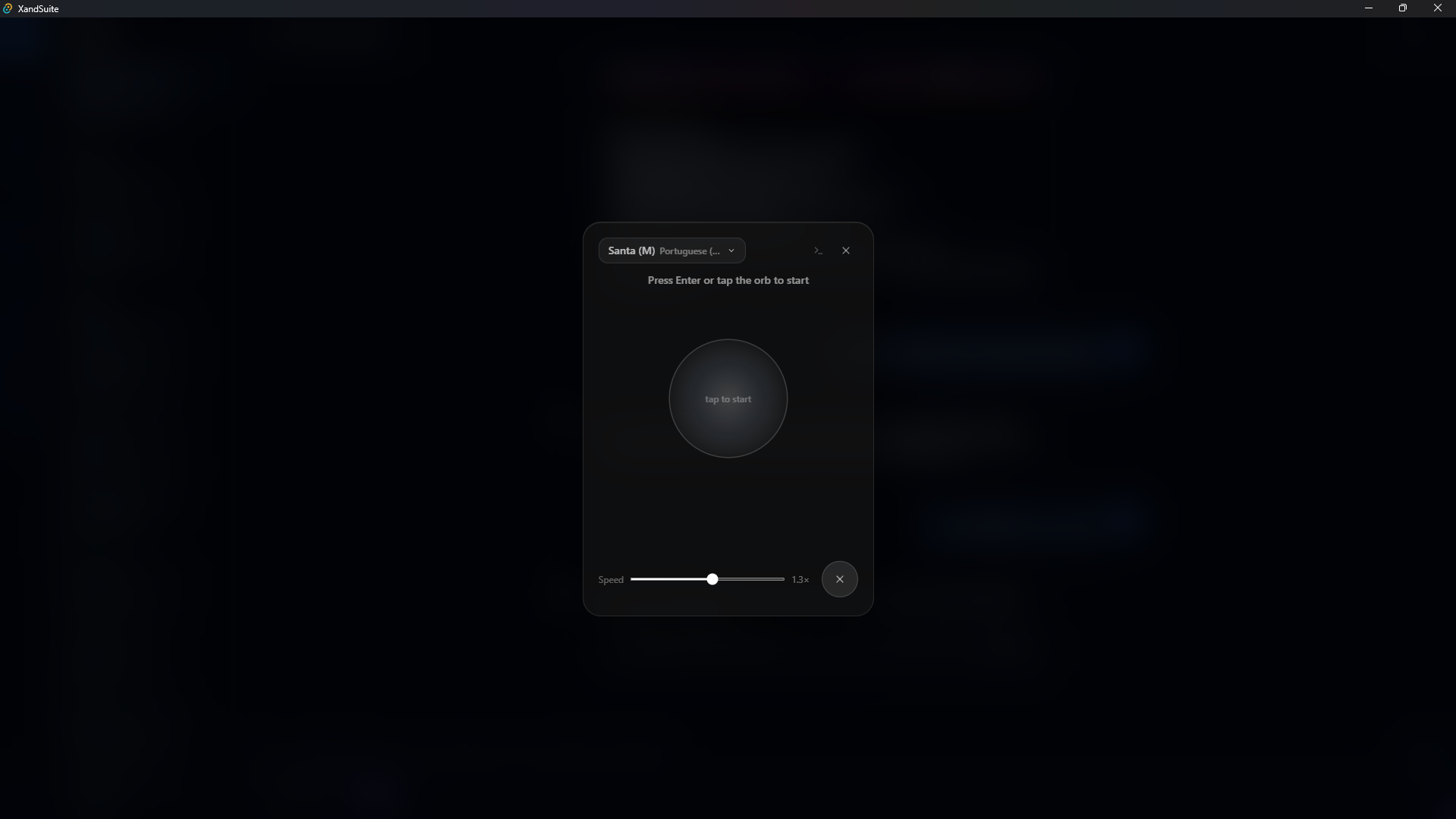
XandSuite Voice-to-Voice Mode
Voice-to-Voice Conversation

Tap the orb and speak. XandSuite listens with Whisper, processes with your local model, and responds aloud with KokoroTTS. A complete voice AI loop — no internet required.

Everything you need, nothing you don't

22 capability areas in a single desktop application. Everything runs on your hardware — private, fast, and always available.

Chat & Conversations

  • Manage multiple conversations — create, rename, delete
  • Streaming responses with stop generation
  • System prompt per conversation
  • File and image attachments for multimodal input
  • Prompt template picker with variable filling
  • Per-message RAG toggle for knowledge retrieval
  • Automatic artifact extraction (code, HTML, and more)
  • Per-conversation image gallery
  • Tool call trace with step-by-step details

Personas

  • Create named AI personas with avatar and personality
  • Custom system prompt per persona
  • Assign personas to conversations for consistent behavior

Prompt Templates

  • Save and reuse prompts across conversations
  • Variable placeholders with a simple fill-in UI
  • Track usage count per template
  • Organize templates by category

Model Management

  • Browse the HuggingFace GGUF catalog with search
  • Download models with progress tracking
  • Local inference server with auto-idle management
  • GPU variant support: CPU, CUDA, Vulkan
  • Tune GPU layers, threads, context size, and batch
  • Connect to any OpenAI-compatible remote server
  • Vision and multimodal model support
  • Reasoning mode with configurable thinking budgets

Voice Input — Whisper

  • Powered by whisper.cpp — runs offline
  • Download base, small, or medium models
  • Real-time audio transcription
  • Configurable language detection and port
  • Microphone button built into the chat bar

Voice Output — KokoroTTS

  • Text-to-speech running fully offline
  • Kokoro-82M voice model, downloaded automatically
  • CPU, CUDA 11, and CUDA 12 support
  • Multiple voices across 10 languages
  • Adjustable speech speed
  • Fast setup with automatic dependency caching

Voice-to-Voice Conversation

  • Full duplex voice conversation mode
  • Animated orb UI during listening and speaking
  • Low-latency replies via sentence-pipelined synthesis

Knowledge Base — RAG

  • Create and manage knowledge collections
  • Ingest documents into searchable vector embeddings
  • Hybrid retrieval combining semantic and keyword search
  • Per-collection retrieval mode configuration
  • Reindex collections at any time
  • Embeddings generated by your local model server

Conversation Memory

  • Automatically extracts facts from your conversations
  • Stores them in a personal memory collection
  • Browse, edit, or clear memories at any time
  • Recalled automatically during future chats

GraphRAG

  • Graph-based knowledge retrieval as an optional layer
  • Supports LanceDB and Qdrant vector store backends
  • Ingest, query, and manage the graph from the UI
  • Configurable auto-start on launch

Skills & MCP Tools

  • Built-in tools: Web Search, Calculator, File Ops, Code Runner
  • Register custom MCP servers via HTTP or stdio
  • Invoke any tool directly from the chat input
  • In-process Python execution for LLM tool calls

Packages — Plugin System

  • Official packages: Jellyfin, ComfyUI, Rich Responses, PDF Tools
  • Author custom packages in the built-in Python editor
  • Automatic dependency management per package
  • Install and uninstall packages without restarting

Image & Video Generation

  • ComfyUI integration for text-to-image, editing, and video
  • Per-conversation and global gallery views
  • Generated images accessible to other tools automatically

Database Connectors

  • Connect to PostgreSQL, MySQL, and MongoDB
  • Save and manage multiple connections
  • Test connections before saving
  • Run queries directly from the UI

Coding Assistant

  • Dedicated coding sessions with agent, plan, debug, and ask modes
  • Project folder picker with file tree explorer
  • Read and reference files during the session
  • Terminal output display
  • Step-by-step task planning

Autonomous Agents

  • Launch, monitor, pause, or cancel agent tasks
  • Agent workspace with file access and task isolation
  • Configurable max iterations and timeout

Artifacts

  • Code and HTML blocks extracted from responses automatically
  • Dedicated artifacts view across all conversations
  • Create, edit, and delete artifacts at any time
  • Updates in place when title and type match

Logs & Observability

  • In-app log viewer with level filtering
  • Error badge in the sidebar for quick visibility
  • Structured event logging across all components

Settings

  • Model engine: HF token, auto-sync, engine config
  • Voice: Whisper and KokoroTTS full configuration
  • Remote LLM endpoint management
  • Knowledge: memory, embeddings, retrieval weights
  • Advanced: code execution limits, agent caps
  • Profile: name, profession, and personal context

HTTP API & Mobile Access

  • Full REST API exposing all desktop capabilities
  • Bearer token authentication
  • Server-sent event streaming for real-time updates
  • Configurable port for mobile or headless access
  • CORS support for cross-origin clients
  • Headless server mode for remote deployments

Installer & Distribution

  • Windows installer — available now
  • macOS — coming soon
  • Linux AppImage and DEB — coming soon

Onboarding

  • First-run wizard to set your name, role, and context
  • Guided model download and setup
  • Ready-to-use prompt templates from the start

Your AI. Your machine. Your rules.

Install XandSuite, pick a model, and you're ready to go — no accounts, no API keys, no internet required.

All releases on GitHub